
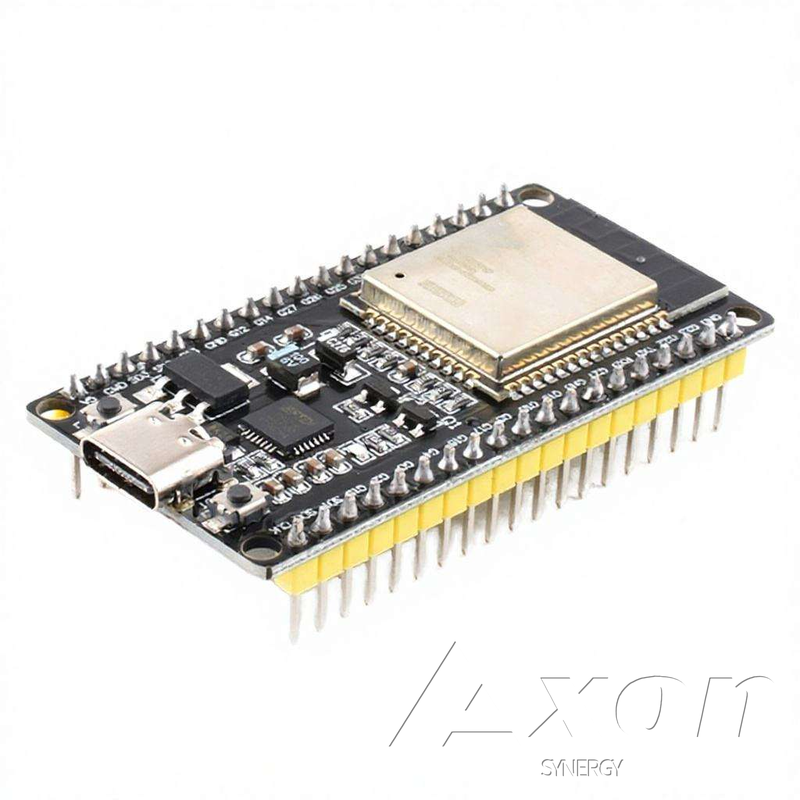
ESP32-WROOM-32 Development Board - 38-Pin WiFi + Bluetooth Dual-Core USB-C
The ESP32-WROOM-32 is the benchmark microcontroller for WiFi and Bluetooth connected projects. This 38-pin development board gives you full access to its dual-core Xtensa LX6 processor running at 240MHz, built-in WiFi 802.11 b/g/n, Bluetooth 4.2, 520KB SRAM, and 4MB flash - all for under $9. The USB-C connector with onboard CP2102 USB-to-serial chip provides plug-and-play connectivity on Windows, Mac, and Linux without driver hunting.
The 38-pin layout exposes every GPIO including ADC inputs, DAC outputs, PWM-capable pins, hardware I2C and SPI buses, UART, and capacitive touch inputs. Breadboard-compatible with 0.1-inch pitch - note the 38-pin version straddles the center channel of a standard breadboard, leaving one row free on each side for wiring. Mounting holes on the board corners allow enclosure integration for finished projects.
What can you build? IoT sensor nodes that push data to the cloud. Web servers that serve a live dashboard directly from the chip. WiFi-controlled LED strips, relay switches, and motor drivers. BLE beacons. MQTT clients for Home Assistant or Node-RED. Temperature, gas, and distance monitors with phone alerts. Mesh networks using ESP-NOW. The ESP32 handles all of this without any external wireless module.
Getting started: Install the ESP32 board package in Arduino IDE via Boards Manager (search 'esp32' by Espressif Systems), select 'ESP32 Dev Module', choose your COM port, and upload. Hundreds of libraries and tutorials are available. Our project guides use this exact board for the Gas Leak Alarm, Parking Sensor, and Temperature Monitor builds.
Specifications
| Processor | Dual-Core Xtensa LX6 @ 240MHz |
|---|---|
| Wireless | WiFi 802.11 b/g/n + Bluetooth 4.2 |
| Memory | 520KB SRAM, 4MB Flash |
| GPIO Pins | 38 (including ADC, DAC, PWM, I2C, SPI, UART) |
| USB | USB-C with CP2102 driver |
| Operating Voltage | 3.3V (5V via USB) |
| Compatibility | Arduino IDE, MicroPython, ESP-IDF |
Frequently Asked Questions
How do I set up the ESP32 in Arduino IDE?
Open Arduino IDE Preferences and add this URL to Additional Board Manager URLs: https://raw.githubusercontent.com/espressif/arduino-esp32/gh-pages/package_esp32_index.json. Then go to Tools, Board, Boards Manager, search 'esp32', and install the package by Espressif Systems. Select 'ESP32 Dev Module' from the board list, choose your COM port, and upload. The CP2102 driver installs automatically on most systems.
How is the ESP32 different from an Arduino Uno?
The ESP32 runs at 240MHz versus the Uno's 16MHz, has built-in WiFi and Bluetooth, significantly more RAM (520KB versus 2KB), and more GPIO pins - all at a similar or lower price. The main tradeoff is that ESP32 GPIO runs at 3.3V logic rather than the Uno's 5V, so 5V sensors need a voltage divider. For any wireless, cloud, or web-connected project, the ESP32 is the clearly superior choice.
Does the 38-pin version fit on a standard breadboard?
The 38-pin ESP32 dev board is wider than the center gap of a standard breadboard - it straddles the divide and leaves only one row free on each side for jumper wires. Many builders use two breadboards side by side, or use female-to-male jumper wires to extend pin access. The narrower 30-pin ESP32 variant fits more cleanly if breadboard space is a priority.
What is the GPIO voltage - can I connect 5V sensors directly?
ESP32 GPIO pins operate at 3.3V logic and are not 5V tolerant on most pins. Connecting a 5V signal directly to a GPIO pin risks damaging the chip. Use a voltage divider or a logic level shifter to convert 5V sensor outputs to 3.3V. The HC-SR04 Echo pin and MQ-2 DO pin are common examples that need voltage conversion before connecting to the ESP32.
Can the ESP32 act as a web server and serve a live dashboard?
Yes. The ESP32 is powerful enough to run a full HTTP web server directly on the chip. Using the AsyncWebServer library in Arduino IDE, or built-in server libraries in MicroPython, you can serve HTML pages with live sensor data, control outputs via buttons, and receive form input - all without any external cloud service or server hardware.